Automating a Scalable Command, Query and Event Package Structure with a Batch Script
Introduction
As backend applications grow, maintaining a consistent project structure becomes increasingly important.
In a small application, developers can manually create packages and folders whenever a new business entity or feature is introduced. However, in a larger application following architectural patterns such as CQRS, Domain-Driven Design, and event-driven architecture, every new feature may require a considerable number of packages. Manually creating these directories can become repetitive, error-prone, and time-consuming. To solve this problem, a reusable Batch script can be introduced to automatically generate the required package and directory structure for a new domain entity.
The script accepts two parameters:
- A base package name
- An entity or feature name
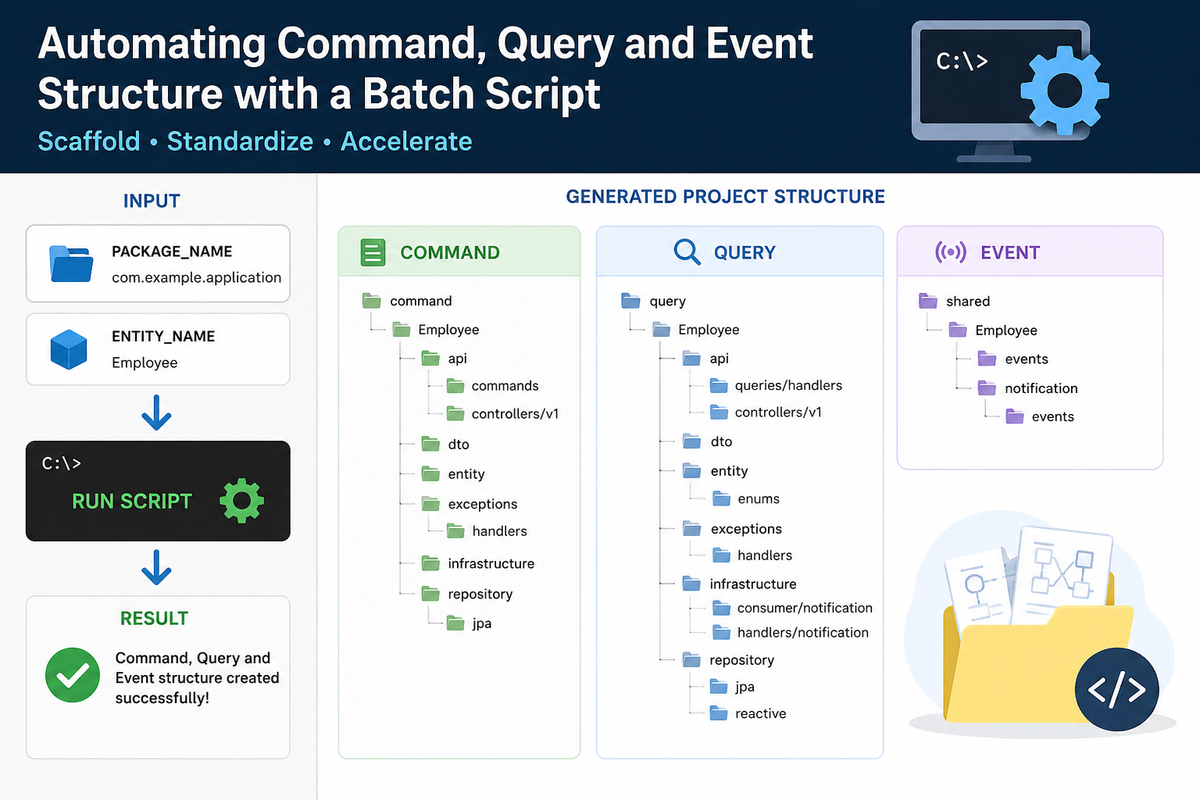
Based on these inputs, it automatically creates the required Command, Query, and Event directory structures.
This approach provides a simple form of project scaffolding that improves development speed while enforcing architectural consistency across the application.
Why Automate Project Structure Creation?
Consider a project following a CQRS-based architecture.
Whenever a new business entity is introduced, developers may need to create directories for:
- Commands
- Controllers
- DTOs
- Entities
- Exception handlers
- Infrastructure
- Repositories
- Queries
- Query handlers
- Query controllers
- Event consumers
- Event handlers
- Shared events
- Notifications
Creating these directories manually for every entity has several disadvantages.
1. Repetitive Work
Developers repeatedly perform the same directory-creation steps.
2. Human Error
It is easy to:
- Miss a directory
- Create a directory in the wrong location
- Use an inconsistent naming convention
- Create an incorrect package hierarchy
3. Architectural Inconsistency
Different developers may create different structures for different features. Over time, this can make the codebase difficult to navigate.
4. Slower Feature Development
Although creating directories takes only a few minutes, the accumulated overhead becomes significant when many entities are introduced.
5. Difficult Onboarding
New developers need to understand where each component belongs before they can start implementing a feature. Automation reduces this friction.
What Does the Script Solve?
The batch script acts as a lightweight project scaffolding tool.
Instead of manually creating the complete structure, a developer provides the required package and entity information. The script then generates the predefined directory hierarchy automatically.
Conceptually, the workflow is:
Developer Input
→ Base Package
→ Entity Name
→ Script Processing
→ Command Structure
→ Query Structure
→ Event Structure
The important point is that the script does not generate business logic.
It generates the structural foundation on which the developer can build the feature.
High-Level Architecture
The generated structure is divided into three major areas:
- Command
- Query
- Shared Events
This separation reflects the responsibilities commonly associated with CQRS and event-driven architectures.
A simplified conceptual structure looks like this:
Base Package
│
├── command
│   └── Entity
│       ├── api
│       ├── dto
│       ├── entity
│       ├── exceptions
│       ├── infrastructure
│       └── repository
│
├── query
│   └── Entity
│       ├── api
│       ├── dto
│       ├── entity
│       ├── exceptions
│       ├── infrastructure
│       └── repository
│
└── shared
    └── Entity
        ├── events
        └── notification
            └── events
The exact implementation can evolve as the architecture grows, but the main principle remains the same:
Create a predictable structure automatically so developers can focus on implementing business functionality rather than repeatedly creating folders.
Understanding the Script
The script can be divided into several logical stages.
1. Parameter Validation
The first responsibility of the script is validating the input.
It expects two parameters:
Package Name
This represents the base package where the new feature should be created.
For example, conceptually: com.company.application
Entity Name
This represents the business entity or feature for which the structure should be generated.
For example: Employee
The script checks whether both parameters have been supplied. If the package name is missing, the script stops and displays an error. The same happens if the entity name is missing. This is important because generating a directory structure without the required information could result in an incomplete or incorrect project structure.
2. Converting Package Names into Directory Paths
Programming languages such as Java and Kotlin commonly represent packages using dot notation.
For example: com.company.application
However, the operating system represents directories using path separators.
The script therefore converts the package notation into a directory-compatible path.
Conceptually: com.company.application
becomes: com\company\application
This allows the script to map a logical package name directly to the corresponding filesystem structure. This small transformation is important because it makes the script reusable for different package hierarchies.
3. Creating the Command Structure
The first major structure generated by the script is the Command side. The Command side represents operations that generally change application state.
The generated structure provides dedicated locations for areas such as:
API Commands
This area can contain command definitions representing business operations.
Examples conceptually include:
- Create
- Update
- Delete
API Controllers
This area can contain controllers responsible for receiving client requests and initiating commands.
DTO
The DTO package provides a dedicated location for request and response-related data structures.
Entity
This area contains the domain or persistence-related entity representation associated with the feature.
Exception Handlers
Feature-specific exception handling can be placed here. This prevents business-specific error handling from becoming scattered throughout the project.
Infrastructure
Infrastructure-related implementations associated with the command side can be placed here.
JPA Repository
Persistence interfaces and implementations related to command-side operations can be maintained here.
4. Creating the Query Structure
The second major structure is the Query side.
Queries are generally responsible for retrieving data without changing application state. The script creates separate locations for query-related responsibilities.
Query Handlers
Query handlers process query requests and coordinate the retrieval of required information. Keeping handlers in a dedicated package makes the read side easier to locate and maintain.
Query Controllers
Controllers expose query functionality through application APIs.
DTO
The Query DTO package can contain structures specifically designed for read operations.
Entity and Enums
The entity area can contain read-side models, projections, or other representations required by the query layer. The dedicated enum package provides a clear location for feature-specific enumerations.
Exception Handlers
Query-specific exceptions can be handled separately from command-side exceptions.
Notification Consumers
The notification consumer area provides a place for components that consume notification-related messages.
Notification Handlers
Notification handling logic can be isolated from the main query processing logic.
JPA Repository
Repositories that use traditional JPA-based persistence can be organized here.
Reactive Repository
Applications that use reactive data access can maintain reactive repositories separately. This distinction becomes particularly valuable when an application supports both traditional and reactive data-access patterns.
5. Creating the Event Structure
The third area created by the script is the shared event structure. Events are useful in event-driven architectures because they allow one part of an application to communicate that something has happened without requiring direct coupling with every consumer. The generated structure provides two major locations.
Domain or Feature Events
The events directory provides a centralized location for events associated with the entity.
Examples conceptually include:
- EntityCreated
- EntityUpdated
- EntityDeleted
The actual events depend entirely on the application's business requirements.
Notification Events
The notification-events area provides a dedicated location for events related to notifications or communication workflows.
This separation makes it easier to distinguish between:
Business events and Notification-related events
Why Command, Query and Event Separation Matters
The most important architectural benefit of this structure is separation of responsibilities. Instead of placing every class related to an entity into a single package, the application separates components based on their purpose.
Conceptually:
Command
Change something
Query
Read something
Event
Communicate that something happened
This makes the architecture easier to understand and helps prevent unrelated responsibilities from becoming tightly coupled.
How to Use the Script
The script is designed to be parameter-driven.
A developer provides:
Parameter 1: Base package
Parameter 2: Entity name
The script uses those values to construct the complete directory structure.
A typical workflow is:
Step 1 — Open the Project Directory
The script should be executed from the appropriate project root.
This ensures that the generated directories appear in the expected source location.
Step 2 — Provide the Base Package
The developer provides the application's base package.
Step 3 — Provide the Entity Name
The developer provides the name of the new entity or feature.
Step 4 — Execute the Script
The script validates the parameters and begins generating directories.
Step 5 — Verify the Generated Structure
After execution, the developer should verify that:
- The package path is correct
- The entity name is correct
- Command directories exist
- Query directories exist
- Event directories exist
Step 6 — Start Implementation
Once the structure is created, developers can begin implementing:
- Commands
- Command handlers
- Queries
- Query handlers
- Controllers
- DTOs
- Entities
- Repositories
- Events
- Consumers
- Exception handling
The script therefore becomes the starting point of the feature-development workflow.
What Happens When an Entity Name Is Provided?
Suppose a developer wants to introduce a new business entity.
The developer provides:
Base Package And Entity Name
The script combines these values with the predefined architectural paths. The result is a complete feature-specific structure. This is important because the developer does not need to remember every directory required by the architecture. The architecture is effectively encoded into the scaffolding process.
Benefits of This Approach
1. Consistency
Every feature starts with the same architectural structure. This makes the codebase predictable. A developer familiar with one feature can quickly understand another feature because the package organization follows the same pattern.
2. Faster Development
Developers no longer need to manually create dozens of directories. The initial setup becomes almost instantaneous.
3. Reduced Human Error
The script eliminates many common structural mistakes. Developers don't have to remember:
- Which directories are required
- Where repositories belong
- Where event classes belong
- Where notification handlers belong
4. Easier Code Navigation
A predictable structure makes it easier to locate components. For example, when investigating a query-related issue, developers know where query handlers and repositories should exist. Similarly, when investigating an event-related issue, developers know where to look for event definitions and notification events.
5. Easier Onboarding
New developers can learn one standard feature structure and apply that knowledge across the application. The directory structure becomes part of the team's architectural documentation.
6. Architectural Enforcement
Although a batch script cannot enforce every architectural rule, it establishes a strong starting point. Instead of architecture being only documented in a wiki or design document, part of the architecture is embedded directly into the development workflow.
The Script as a Lightweight Scaffolding Tool
The script can be considered a simple form of code scaffolding. Scaffolding means automatically generating the initial structure required to implement something. Many modern development ecosystems provide sophisticated scaffolding tools. However, not every project needs a complex framework or generator.
A small batch script can be extremely effective when:
- The architecture is stable
- The directory structure is predictable
- Features repeatedly require the same structure
In such scenarios, simplicity can be an advantage.
What the Script Does Not Do
It is equally important to understand the limitations. The script creates directories, but it does not implement functionality.
It does not automatically create:
- Business logic
- Domain rules
- Commands
- Query handlers
- Controllers
- Repository implementations
- Event definitions
- Database schemas
- API documentation
- Unit tests
- Integration tests
Therefore, it should be viewed as a structural generator, not a complete feature generator.
Recommended Development Workflow
A good workflow can look like this:
1. Identify the business feature
↓
2. Define the entity
↓
3. Run the scaffolding script
↓
4. Verify the generated structure
↓
5. Create domain entities
↓
6. Define commands
↓
7. Implement command handling
↓
8. Define queries
↓
9. Implement query handling
↓
10. Add repositories
↓
11. Define required events
↓
12. Implement consumers and notification handlers
↓
13. Add exception handling
↓
14. Build and validate the application
This creates a repeatable development process for every new feature.
Naming Conventions
Automation works best when naming conventions are clearly defined. The entity name should follow the project's established naming standards.
For example, teams should decide whether entity names should be:
- Singular or plural
- PascalCase
- camelCase
- Domain-oriented
- Feature-oriented
Consistency is particularly important because the entity name becomes part of the generated package hierarchy. A poor naming convention in the input can propagate throughout the generated structure.
Important Considerations
Project Root
The script assumes that it is executed from the expected project location. Running it from an incorrect directory could create the generated structure in the wrong place. Therefore, developers should verify the current working directory before execution.
Existing Directories
The script creates directories that may already exist. In most development environments, this is generally harmless, but teams should still understand how the underlying directory commands behave when the target structure already exists.
Naming Validation
The script validates that parameters are present, but that does not necessarily mean that the values are semantically valid. For example, a malformed package name or an entity name containing unexpected characters could produce an undesirable structure. A future version could add stricter validation.
When Should You Use This Approach?
This approach is especially useful when:
- The project has a well-defined architecture
- New entities are added frequently
- Every entity follows a similar structure
- Multiple developers work on the same codebase
- Consistency is important
- Manual folder creation has become repetitive
It may be unnecessary for very small applications where the project structure is simple.
When Should You Consider a More Advanced Generator?
A batch script is excellent for simple structural generation.
However, if the project requires extensive automation, consider moving toward a dedicated generator when you need:
- Source-code templates
- Interactive configuration
- Cross-platform support
- Advanced validation
- Automatic test generation
- Database migration generation
- API generation
- IDE integration
- Multiple architecture templates
At that point, a dedicated CLI or build-tool-based generator may provide more long-term value.
Architectural Value Beyond Folder Creation
At first glance, the script may appear to be nothing more than a collection of directory-creation commands. Its real value, however, is architectural. The script captures the team's expectations about how a new feature should be organized. Without automation, developers need to remember the architecture. With automation, the architecture becomes part of the workflow.
This creates an important principle:
Development tooling can act as an executable form of architectural documentation.
When a developer creates a new feature, the generator immediately demonstrates where different responsibilities belong.
Team-Level Benefits
For a development team, standardized scaffolding can have an even greater impact.
Consistent Code Reviews
Reviewers can focus more on business logic because structural inconsistencies are reduced.
Faster Feature Setup
Developers can start implementing functionality immediately.
Easier Maintenance
Future developers can predict where components should be located.
Reduced Knowledge Dependency
The team becomes less dependent on individual developers remembering the complete package structure.
Better Architectural Discipline
The standard structure encourages developers to keep commands, queries, and events separated.
Best Practices
To get the most value from this approach, teams should follow a few practices.
Keep the Generator Simple
A scaffolding tool should reduce complexity, not introduce more complexity.
Keep the Generated Structure Relevant
Every generated directory should have a clear purpose. Avoid creating directories that are never used.
Document the Conventions
Developers should understand why the directories exist, not just where they are located.
Review the Structure Periodically
As the architecture evolves, the generator should evolve with it.
A Practical Mental Model
The easiest way to understand this solution is to think of it as a feature template. Every new feature starts from the same foundation.
The script essentially says:
"Whenever a new entity is introduced, this is the standard architectural structure it should begin with."
The developer then fills that structure with the actual implementation.
This creates a clear separation between:
Scaffolding and Implementation
The script handles the first part. The developer handles the second.
Conclusion
A simple batch script can provide significant value when used to automate a consistent Command, Query and Event structure. Its primary purpose is not to generate business logic. Instead, it removes repetitive structural work and establishes a standardized foundation for feature development.
The approach provides several benefits:
- Faster feature initialization
- Consistent package organization
- Reduced structural errors
- Easier navigation
- Better onboarding
- Improved architectural consistency
- Repeatable development workflows
More importantly, it demonstrates a broader engineering principle:
Whenever developers repeatedly perform the same structural task, that process is a candidate for automation.
A small amount of automation at the beginning of the development lifecycle can save considerable time over the lifetime of a project. As the system grows, the same idea can evolve from a simple directory generator into a complete scaffolding solution capable of generating source files, tests, configurations, and other feature components. The current approach is therefore a practical first step toward standardized, repeatable, and architecture-aware feature development.