GitLab CI/CD Pipeline Documentation

Overview
This repository uses a multi-environment GitLab CI/CD pipeline for a Spring Boot Reactive (WebFlux) application.
The pipeline provides:
- Automated build and deployment
- Parallel deployment to multiple test environments
- Mattermost notifications with changelog support
- Automatic handling of unavailable GitLab runners
- Deployment status tracking
- Production deployment authorization controls
- Deployment failure notifications with job logs
Architecture
Test Environments
| Environment | Location | Runner Tag |
|---|---|---|
| TH | Test Server Location 1 | th-runner |
| KP | Test Server Location 2 | kp-runner |
Both environments build and deploy independently.
Pipeline success requires at least one test deployment to complete successfully.
Pipeline Stages
notify_start
    │
    ▼
build_test
    ├── build_test_th
    ├── build_test_kp
    └── pending_job_monitor_build_test
    │
    ▼
deploy_test
    ├── deploy_test_th
    ├── deploy_test_kp
    └── pending_job_monitor_deploy_test
    │
    ▼
pipeline_complete
    │
    ▼
deploy_prod (manual)
Stage Details
1. notify_start
Purpose
Sends a pipeline start notification to Mattermost.
Features
- Includes pipeline link
- Includes changelog
- Displays recent commits
Example:
🚀 Build STARTED

Changes in this build:

- abc123 Fixed login issue
- def456 Added Kafka consumer
- ghi789 Updated API validation
2. build_test
Jobs
build_test_th
Builds application for TH environment.
build_test_kp
Builds application for KP environment.
Build Process
- Copy example property files
- Generate environment-specific property file
- Run Gradle build
./gradlew clean build \
-Pspring.config.additional-location=file:./application-test.properties
Generated Artifacts
build/libs/spring-boot-template-cqrs-1.0.0.jar
application-test.properties
Artifacts expire after:
1 day
3. Runner Availability Monitoring
pending_job_monitor_build_test
Problem:
If a dedicated runner is unavailable, jobs can remain stuck in Pending.
Solution:
After 30 seconds:
- Wait configured timeout
- Query GitLab API
- Detect pending jobs
- Cancel stuck jobs automatically
Current timeout:
PENDING_JOB_TIMEOUT=15
4. deploy_test
Jobs
deploy_test_th
Deploys build artifact to TH environment.
deploy_test_kp
Deploys build artifact to KP environment.
Deployment Flow
Step 1
Backup existing JAR
old.jar -> old.jar_bkp
Step 2
Upload new JAR
scp build/libs/app.jar
Step 3
Upload generated property file
scp application.properties
Step 4
Execute remote deployment command
Example:
docker compose restart
or
systemctl restart my-service
Deployment Validation
Deployment only proceeds if:
Build succeeded
AND
Artifact exists
Otherwise deployment is skipped.
5. Runner Availability Monitoring (Deploy)
pending_job_monitor_deploy_test
Automatically cancels deploy jobs that remain pending due to unavailable runners.
6. pipeline_complete
Purpose
Determines final pipeline status.
Success Criteria
Pipeline succeeds if:
TH deployment succeeded
OR
KP deployment succeeded
Failure Criteria
Pipeline fails if:
TH deployment failed
AND
KP deployment failed
Examples:
| TH | KP | Pipeline |
|---|---|---|
| Success | Success | Success |
| Success | Failed | Success |
| Failed | Success | Success |
| Failed | Failed | Failed |
7. deploy_prod
Type
Manual deployment.
Authorization
Only approved GitLab users can deploy to production.
Validation:
GITLAB_USERS_IDS_FOR_PROD_DEPLOY
contains:
GITLAB_USER_ID
Unauthorized users receive:
❌ User is not authorized for production deployment
Production Deployment Steps
- Backup current JAR
- Upload new JAR
- Upload property file
- Execute production deployment command
- Send Mattermost notification
Mattermost Notifications
Start Notification
Color:
Blue
Example:
🚀 Build STARTED
Deployment Success
Color:
Purple
Example:
✅ TH Deploy SUCCESS
Pipeline Success
Color:
Green
Example:
🎉 Pipeline SUCCESS
Failure Notification
Color:
Red
Includes:
- Error details
- Last 50 log lines
- Pipeline link
- Job URL
Example:
❌ Deploy FAILED

Job Log:
...
Changelog Generation
Each pipeline automatically generates a changelog.
Information included:
- Commit hash
- Author
- Commit message
Example:
- abc123 Added Kafka consumer [John]
- def456 Fixed Redis configuration [Mike]
Limits:
| Variable | Value |
|---|---|
| MAX_COMMIT_MSG_LENGTH | 100 |
| MAX_COMMITS_TO_SHOW | 10 |
Required GitLab Variables
General
APP_NAME

GYRI_TEST_PROPERTY_FILE

GYRI_TEST_MATTERMOST_WEBHOOK
ALL_FAIL_MATTERMOST_WEBHOOK

GITLAB_API_TOKEN
TH Environment
GYRI_TEST_TH_SERVER_USER
GYRI_TEST_TH_SERVER_01
GYRI_TEST_TH_SERVER_01_DEPLOYMENT_PATH

TEST_TH_DEPLOY_COMMAND

TEST_TH_APP_LOG_FILE_PROPERTY
TEST_TH_APP_BASE_SERVER_URL
TEST_TH_SWAGGER_SERVER_URL

TEST_TH_REDIS_HOST
TEST_TH_REDIS_PORT
TEST_TH_REDIS_TOPIC_PREFIX

TEST_TH_MONGO_HOST
TEST_TH_MONGO_PORT
TEST_TH_MONGO_DATABASE
TEST_TH_MONGO_USERNAME
TEST_TH_MONGO_PASSWORD
TEST_TH_MONGO_AUTH_DATABASE

TEST_TH_KAFKA_SECURITY_PROTOCOL
TEST_TH_KAFKA_SASL_MECHANISM
TEST_TH_KAFKA_SASL_JAAS_CONFIG
TEST_TH_KAFKA_SERVERS
TEST_TH_KAFKA_CONSUMER_GROUP_ID
TEST_TH_KAFKA_TOPIC_PREFIX
KP Environment
GYRI_TEST_KP_SERVER_USER
GYRI_TEST_KP_SERVER_01
GYRI_TEST_KP_SERVER_01_DEPLOYMENT_PATH

TEST_KP_DEPLOY_COMMAND

TEST_KP_APP_LOG_FILE_PROPERTY
TEST_KP_APP_BASE_SERVER_URL
TEST_KP_SWAGGER_SERVER_URL

TEST_KP_REDIS_HOST
TEST_KP_REDIS_PORT
TEST_KP_REDIS_TOPIC_PREFIX

TEST_KP_MONGO_HOST
TEST_KP_MONGO_PORT
TEST_KP_MONGO_DATABASE
TEST_KP_MONGO_USERNAME
TEST_KP_MONGO_PASSWORD
TEST_KP_MONGO_AUTH_DATABASE

TEST_KP_KAFKA_SECURITY_PROTOCOL
TEST_KP_KAFKA_SASL_MECHANISM
TEST_KP_KAFKA_SASL_JAAS_CONFIG
TEST_KP_KAFKA_SERVERS
TEST_KP_KAFKA_CONSUMER_GROUP_ID
TEST_KP_KAFKA_TOPIC_PREFIX
Production
GYRI_PROD_SERVER_USER
GYRI_PROD_SERVER_HOST
GYRI_PROD_SERVER_SSH_PORT
GYRI_PROD_SERVER_DEPLOYMENT_PATH

PROD_DEPLOY_COMMAND

GYRI_PROD_MATTERMOST_WEBHOOK

GITLAB_USERS_IDS_FOR_PROD_DEPLOY
GitLab Runner Registration
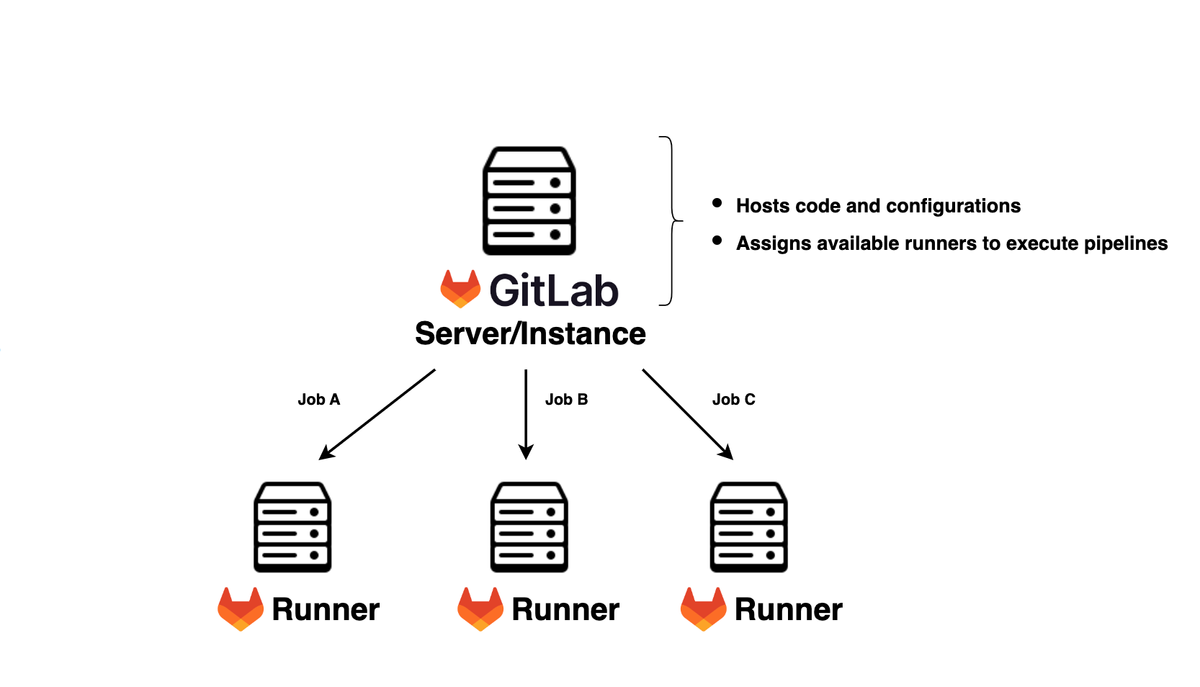
The pipeline requires three runners:
| Runner | Tag |
|---|---|
| TH Runner | th-runner |
| KP Runner | kp-runner |
| Production Runner | prod-runner |
Install GitLab Runner
Ubuntu/Debian
curl -L \
https://packages.gitlab.com/install/repositories/runner/gitlab-runner/script.deb.sh \
| sudo bash

sudo apt install gitlab-runner
Verify:
gitlab-runner --version
Register TH Runner
sudo gitlab-runner register
Prompts:
GitLab URL:
https://gitlab.example.com

Registration Token:
<project-runner-token>

Description:
th-runner

Tags:
th-runner

Executor:
shell
Register KP Runner
sudo gitlab-runner register
Prompts:
GitLab URL:
https://gitlab.example.com

Registration Token:
<project-runner-token>

Description:
kp-runner

Tags:
kp-runner

Executor:
shell
Register Production Runner
sudo gitlab-runner register
Prompts:
GitLab URL:
https://gitlab.example.com

Registration Token:
<project-runner-token>

Description:
prod-runner

Tags:
prod-runner

Executor:
shell
Verify Registered Runners
sudo gitlab-runner list
Example:
th-runner
kp-runner
prod-runner
Start Runner Service
sudo systemctl enable gitlab-runner
sudo systemctl start gitlab-runner
Check status:
sudo systemctl status gitlab-runner
Deployment Directory Structure
Expected structure on target servers:
template-spring-cqrs-reactjs/

├── server/
│
├── artifacts/
│   ├── application.jar
│   └── application.jar_bkp
│
└── server-config/
    └── application.properties
Failure Handling
The pipeline is designed to tolerate infrastructure failures.
Examples:
TH Runner Offline
TH Build → Failed

KP Build → Success

KP Deploy → Success

Pipeline → SUCCESS
KP Runner Offline
TH Build → Success

TH Deploy → Success

Pipeline → SUCCESS
Both Runners Offline
TH Build → Failed

KP Build → Failed

Pipeline → FAILED
Summary
This pipeline provides:
- Multi-location deployment (TH + KP)
- Spring Boot Reactive build automation
- Automatic changelog generation
- Mattermost notifications
- Job log reporting on failures
- Runner health monitoring
- Automatic cancellation of stuck jobs
- Production deployment authorization
- Artifact backup and rollback preparation
- High availability deployment strategy