Theme Editor(Ant Design)

Steps for adding Color theme for web project
Step 1: To create component style in src.
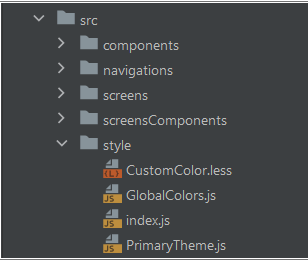
Step 2: To create file called Global colors and then to add color constant shade to this file .
export const  WHITE_COLOR = '#FFF';

export const PRIMARY_COLOR = '#265DBB';
export const PRIMARY_20 = 'rgba(245,246,248,0.5)';
export const PRIMARY_50 = '#f4f7fd';
export const PRIMARY_100 = '#78A0E4';
export const PRIMARY_200 = '#78A0E4';
export const PRIMARY_300 = '#5688DD';
export const PRIMARY_400 = '#3470D6';
export const PRIMARY_500 = '#265DBB';
export const PRIMARY_600 = '#1D468C';
export const PRIMARY_700 = '#132F5E';
export const PRIMARY_800 = '#0A172F';
export const PRIMARY_900 = '#000000';
Step 3: To create file called Custom Color & Also add same color shade constant to CustomColor.less file and use this color to screen components.
@login-form-shadow-color: #BDC6EE;
@PRIMARY_COLOR : #265DBB;
@PRIMARY_50 : #ABC4EE;
@PRIMARY_100 : #78A0E4;
@PRIMARY_200 : #78A0E4;
@PRIMARY_300 : #5688DD;
@PRIMARY_400 : #3470D6;
@PRIMARY_500 : #265DBB;
@PRIMARY_600 : #1D468C;
@PRIMARY_700 : #132F5E;
@PRIMARY_800 : #0A172F;
@PRIMARY_900 : #000000;
@WHITE_COLOR : #FFF;
@RED_600 : #f70800;
@BLACK_COLOR : #000000;
Step 4: Next create primary theme file and then use Global color in it.
import {PRIMARY_100, PRIMARY_50, PRIMARY_900, PRIMARY_COLOR} from './GlobalColors';

const PrimaryTheme = {
  token: {
    colorPrimary: PRIMARY_COLOR,
    fontFamily: 'Mulish',
  },
  components: {
    Table: {
      colorBgContainer: PRIMARY_50,
      colorFillAlter: PRIMARY_100,
      colorBorderSecondary: PRIMARY_900,
      borderRadiusLG: 0,
    },
  },
};

export default PrimaryTheme;
Step 5: How to use color in component.
- Create less file.
- Add .classname for particular component.
- Add required styles eg. border: 2px solid @GRAY_200;
- import required custom color path.
@import '../../../../style/CustomColor';

.main-container {
  border: 2px solid @GRAY_200;
  background-color: @WHITE_COLOR;
  box-shadow: @GRAY_200 0 1px 0 0, @GRAY_200 0 2px 5px 0;
}
3