What is Kafka? (Part 1)
Definition:
Kafka, in simple terms, is a distributed-infrastructure used to store, manage and process events in real-time.
In traditional software world, developers visualized data as tables which represents things in real world like for example, items in an inventory, signed-up users, cars in a showroom, etc.
But what about things like item being dispatched from storeroom, user clicking somewhere on your website, driver picking up the client from a particular location?
You guessed it right! These are all events.
So, Kafka helps us process these events in real time, meaning the moment that particular event took place.
Hence, there is no such concept of storing these events in a file or a table for processing them in a batch in future.
However, this does not goes on to conclude that Kafka cannot remember events that already took place. Kafka is built to remember these events.
Lets understand the need for Kafka with the help of this simple example.
Consider a thermostat_readings table.
| sensor_id | location | temperature | read_at |
|---|---|---|---|
| 42 | Mumbai | 24 | 1700 |
| 51 | Delhi | 22 | 1715 |
| 76 | Calicut | 25 | 1600 |
Now, suppose we need to update the thermostat reading for sensor_id 42 from 24 to 20, we will destructively change the value in temperature column for sensor id 42 from 24 to 20.
So our new table, looks like:
| sensor_id | location | temperature | read_at |
|---|---|---|---|
| 42 | Mumbai | 20 | 1700 |
| 51 | Delhi | 22 | 1715 |
| 76 | Calicut | 25 | 1600 |
The critical issue here is that, we lost our previous info (context) of the sensor_id in Mumbai, like how quickly the temperature shoots up here or at what time of day it heats up.
To overcome this crucial challenge, Kafka implements logs.
Now you might be wondering what are logs?
Logs can be interpreted as an abstraction used by Kafka to store events as a sequence of data items. Mostly these data items are referred as events and quiet rarely called as messages.
The data items are appended at the very end, and items which are already present are never changed! You never modify these logs.
In Kafka, logs are known as Topics. So topics are where our messages get accumulated. And ALWAYS remember, messages in Kafka are IMMUTABLE! Once you write them into a topic, you cannot modify them. Basically, its an event which has happened and you cannot rewrite history; as same as you cannot change your past, simple as that!
So, in a gist, a topic is analogous to a table in a database, and we have numerous tables in a database; similarly we can have numerous topics in a single Kafka cluster.
NOTE: The messages in a topic can be of different format unlike a schema which needs to be followed in a database table.
The reason behind this is, that Kafka stores these messages as plain bytes. So format or schema doesn't matter.
How do you filter out messages out of a topic then?
Just like we deal with immutable data structures in various programming languages. Create a copy of that topic and filter out the unnecessary messages.
MISCONCEPTION: Topics are Logs. Not queues.
When a queue is read, the item is taken out of the queue and read. Now, nobody else can read that value. In a Kafka topic, when a message is read, it still stays intact. I can comeback after a few years and read that same message again!
More on Kafka message:
Its a value, associated with a key.
For example, consider this JSON:
{
"sensor_id": 42,
"location": "Mumbai",
"temperature": 22,
"read_at": 1700
}
Here, the 'sensor_id' becomes the key. This key is basically an identifier the payload relates to. Generally any unique id is taken as the key. Its not mandatory, but highly recommended to have a key!
We also got the timestamp, which tells us the moment the producer created that message.
The message also has some light-weight headers, and the most important parts of a Kafka message are topic, partition and offset!
Policies available in Kafka to prevent your disk from running out of space:
1. Log retention: delete old data or trim logs by size
2. Log compaction: keep only the latest value per key as sometimes context or history is irrelevant to maintain.
How Kafka scales?
If we limit our Kafka topic to a single node, then we will be restricting the topic's ability to scale to the node's disk space.
Since, Kafka is a distributed system, we partition the topic into several partitions.
Once partitions are created we need to decide to which partition the message goes to.
The message key helps us to make this decision. If the key is NULL, the messages are distributed in a round robin fashion. If not NULL and to ensure that a message with a certain key ALWAYS goes into a particular partition, hash the message key against a hash function mod the number of partitions and the output of this hash function is the partition number where the message goes to. This also helps us order our messages.
A few terminologies:
- Cluster: A collection of one or more Kafka brokers working together to share the workload and provide redundancy (simply, a network of nodes).
- Node: The underlying physical or virtual infrastructure that hosts a broker (simply, machine with some disk space for storage purposes).
- Broker: A single Kafka server process that receives, stores, and fetches data (simply, a Kafka software process running on a node).
Point to note here is that, a broker has access to disk space on that node on which it's running; this disk space is basically SSD which is tightly coupled next to the processor.
Brokers are responsible for handling incoming requests to write new messages to partitions as well as read messages out of them.
Replication (for fault tolerance):
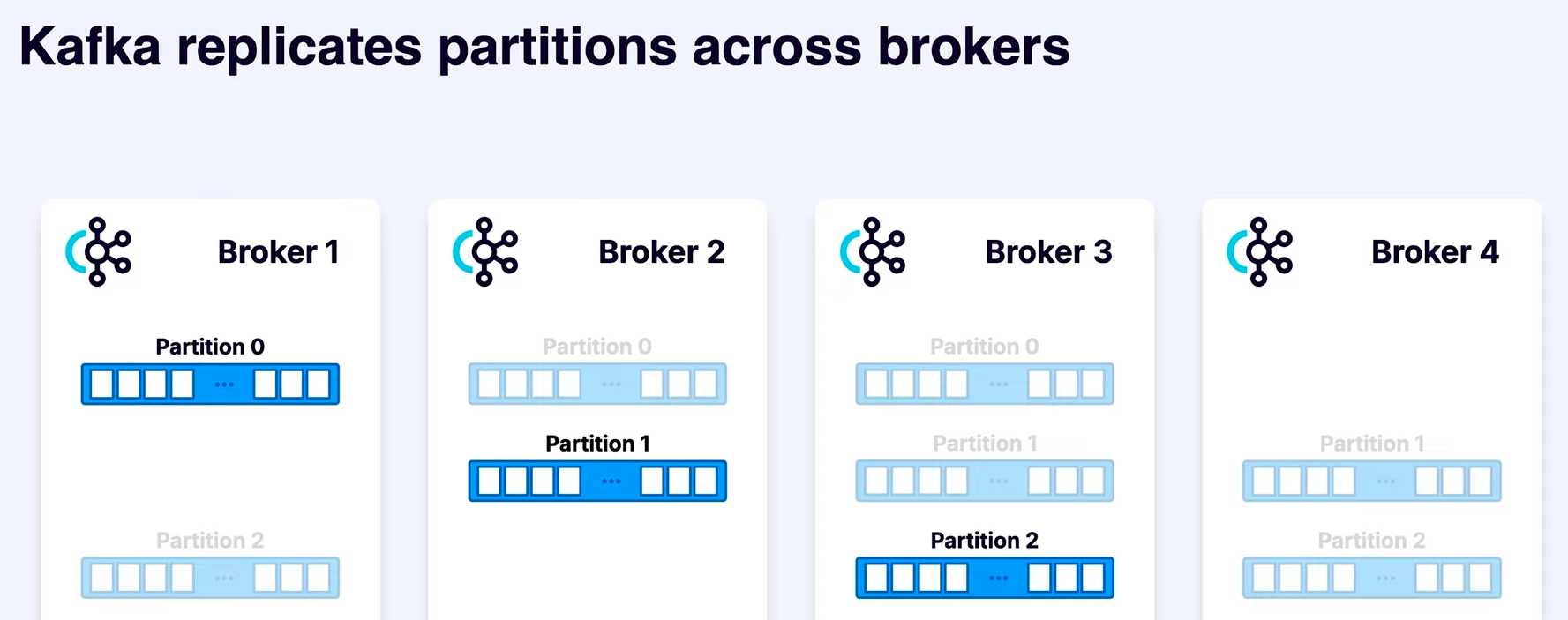
What is Replication factor?
Number of copies created for each partition.
We set the replication factor (n), which in above case is 3. The darker one is termed as Leader (lead replica) whereas the remaining (n-1) copies are called as followers.
Messages are preferred to be written into and read from the leader but in rare scenarios we might write and read from a replica which is nearest to us in the network.
Meanwhile, as messages are written into the lead replica, the followers keep scrapping out the newly written messages from the leader to keep themselves updated and have everything replicated.
Now in case the Broker 1 fails, we still have copies of Partitions 0 (with brokers 2, 3) and 2 (with brokers 3, 4).
Here, Broker 1 had the leader of partition 0. So new leader will be elected for partition 0.
PRODUCER:
A producer is nothing but a Kafka client which writes data into the Kafka partition.
CONSUMER:
A consumer is a Kafka client that reads from the Kafka topic.
In short, anything which is not a broker, is, at the end of the day a producer or a consumer.
REFERENCE:
Apache Kafka 101 - https://developer.confluent.io/courses/apache-kafka/events/